| Final Fantasy X |
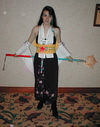
|
Submitter(s): Sakuracon 2002 |
| Costume |
|
| Download: |
[550x700 (122.48k)] |
| Comment: |
No Comment
|
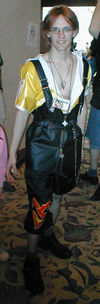
|
Submitter(s): Sakuracon 2002 |
| Costume |
|
| Download: |
[230x700 (73.42k)] |
| Comment: |
No Comment
|
|
Submitter(s): Sakuracon 2003 |
| Costume |
|
| Download: |
[640x480 (74.1k)] |
| Comment: |
No Comment
|
|
Submitter(s): Sakuracon 2003 |
| Costume |
|
| Download: |
[402x640 (71.7k)] |
| Comment: |
No Comment
|

|
Submitter(s): Sakuracon 2003 |
| Costume |
|
| Download: |
[800x408 (107.48k)] |
| Comment: |
No Comment
|
|
Submitter(s): Sakuracon 2003 |
| Costume |
|
| Download: |
[575x900 (126.53k)] |
| Comment: |
No Comment
|

|
Submitter(s): Sakuracon 2003 |
| Costume |
|
| Download: |
[575x900 (107.2k)] |
| Comment: |
No Comment
|
|
Submitter(s): Secret Asian Man |
| Wallpaper |
|
| Download: |
[1024x768 (319.24k)] |
| Comment: |
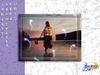
This is a little something I put together for a friend. She's an excellent cosplayer, as you can see. One of my previous project was to recreate the sending
at Kilika. So, with her permission, I made a nice digital artwork out of
her. I like it so much, I decided to turn it into a wallpaper. There's two
versions, one for the Mac and the other for the PC. We see a lot of wallpaper
featuring Yuna, but none featured an excellent cosplayer. I hope you like
it!
Here's a quick synopsis on how I made this.
Ikai Okuri - This was a project in itself. So, I'll break it down.
Nessa/Yuna: I took a pic of Nessa and traced her with the pen path tool. Then,
converted to selection and copy & pasted her into ikai_okuri.psd. To make
her blend in with the picture of a sunset over a lake, I scaled her down a
bit. Then, I adjusted the hue & saturation and added the lighting filter.
(This took A LOT of adjusting.) To add depth of field perception, I progressively
blurred her wand. For her reflection, I just pasted a copy under her, flip
vertically, added the ripple filter, and changed the blending and opacity.
Pyreflies: This is a rather tedious one. Fortunately, I found a Photoshop
action that helps me make it. Someday, I'm gonna follow that action closely
so I know exactly how it's done.
Sunset: The only thing I did to it was progressively blurred the bottom foreground
of the lake to add depth of field.
Wallpaper - Here's the second part.
Ikai Okuri: I just placed the image into the document and added drop shadows.
Then selected two borders around it and cut into new layer. I then lowered
the fill opacity and applied a bevel down style.
Hymns of the Fayth: I scanned the lyrics to the Song of Prayers into Photoshop.
Then selected the hiragana and copy & paste into the document. Did a bit
of scaling and layer styles (Bevel, Outer Glow, Drop Shadow.) And placed
it to the side. I also made another copy and enlarged and blurred it to put
in the background.
Sidebar: Do I really need to explain how to do this? I just a pastel purple
because... I dunno... It just looked good, I guess.
Water Droplets: I learned this from "Photoshop 6 Down & Dirty Tricks" By Scott
Kelby. First, I filled a new layer with white. Then applied the Add Noise
Filter. Then I blurred it with the Gaussian Blur Filter. After that, I adjusted
the Threshold so that water droplets form. Then blurred it again and readjust
the threshold to make the smaller droplets. Using the Magic Wand, I selected
the white are and deleted it. Then, inversed the selection and filled the
droplets with gray. I also beveled it and stroked them, Next, I created
a new layer below it and merged down to merge the layer style. Then, I changed
the blending to hard light and adjusted the curve to give it that shiny look.
FF X Logo: Just placed it into document, scaled down, and blend to screen.
Watermark: I didn't explain this last time. It's just a similar style to
the TV networks when they display their logo on lower right corner during
shows. I just typed my SN in the font, Ethocentric. Then set fill to 0% and
beveled it.
|

|
Submitter(s): Secret Asian Man |
| Wallpaper |
|
| Download: |
[1024x768 (323.85k)] |
| Comment: |
This is a little something I put together for a friend. She's an excellent cosplayer, as you can see. One of my previous project was to recreate the sending
at Kilika. So, with her permission, I made a nice digital artwork out of
her. I like it so much, I decided to turn it into a wallpaper. There's two
versions, one for the Mac and the other for the PC. We see a lot of wallpaper
featuring Yuna, but none featured an excellent cosplayer. I hope you like
it!
Here's a quick synopsis on how I made this.
Ikai Okuri - This was a project in itself. So, I'll break it down.
Nessa/Yuna: I took a pic of Nessa and traced her with the pen path tool. Then,
converted to selection and copy & pasted her into ikai_okuri.psd. To make
her blend in with the picture of a sunset over a lake, I scaled her down a
bit. Then, I adjusted the hue & saturation and added the lighting filter.
(This took A LOT of adjusting.) To add depth of field perception, I progressively
blurred her wand. For her reflection, I just pasted a copy under her, flip
vertically, added the ripple filter, and changed the blending and opacity.
Pyreflies: This is a rather tedious one. Fortunately, I found a Photoshop
action that helps me make it. Someday, I'm gonna follow that action closely
so I know exactly how it's done.
Sunset: The only thing I did to it was progressively blurred the bottom foreground
of the lake to add depth of field.
Wallpaper - Here's the second part.
Ikai Okuri: I just placed the image into the document and added drop shadows.
Then selected two borders around it and cut into new layer. I then lowered
the fill opacity and applied a bevel down style.
Hymns of the Fayth: I scanned the lyrics to the Song of Prayers into Photoshop.
Then selected the hiragana and copy & paste into the document. Did a bit
of scaling and layer styles (Bevel, Outer Glow, Drop Shadow.) And placed
it to the side. I also made another copy and enlarged and blurred it to put
in the background.
Sidebar: Do I really need to explain how to do this? I just a pastel purple
because... I dunno... It just looked good, I guess.
Water Droplets: I learned this from "Photoshop 6 Down & Dirty Tricks" By Scott
Kelby. First, I filled a new layer with white. Then applied the Add Noise
Filter. Then I blurred it with the Gaussian Blur Filter. After that, I adjusted
the Threshold so that water droplets form. Then blurred it again and readjust
the threshold to make the smaller droplets. Using the Magic Wand, I selected
the white are and deleted it. Then, inversed the selection and filled the
droplets with gray. I also beveled it and stroked them, Next, I created
a new layer below it and merged down to merge the layer style. Then, I changed
the blending to hard light and adjusted the curve to give it that shiny look.
FF X Logo: Just placed it into document, scaled down, and blend to screen.
Watermark: I didn't explain this last time. It's just a similar style to
the TV networks when they display their logo on lower right corner during
shows. I just typed my SN in the font, Ethocentric. Then set fill to 0% and
beveled it.
|

|
Submitter(s): Secret Asian Man |
| Wallpaper |
|
| Download: |
[1024x768 (94.35k)] |
| Comment: |
A simple, yet beautiful wallpaper of Tidus and Yuna.
|
-sm.jpg)
|
Submitter(s): Shanna Marie |
| Wallpaper |
|
| Download: |
[800x600 (186.53k)] |
| Comment: |
A blue wallpaper from the aeon Shiva. 800x600 Resolution
|
-sm.jpg)
|
Submitter(s): Sheriru//Haru//Cheryl |
| Wallpaper |
|
| Download: |
[800x600 (67.95k)] |
| Comment: |
One of my first wallpapers that I have been content with,even though I still haven't made a larger version than 800x600..
|
|
Submitter(s): Sierra |
| Wallpaper |
Featured Submission |
| Download: |
[1024x768 (109.71k)] |
| Comment: |
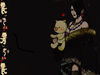
This is a wallpaper of Lulu I made with one of her official arts,and a border of the moogle and cait sith dolls.I put her main quote in(the japanese version of it,because it looked cooler,heh)and well..I guess that's all.
|
|
Submitter(s): Sierra |
| Wallpaper |
|
| Download: |
[1024x768 (118.88k)] |
| Comment: |
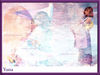
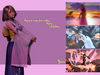
This is a wallpaper I made of Yuna,from FFX.I put 3 differant official wallpapers together and added a few pics,and tossed in some quotes made by her in the game.
|
|
Submitter(s): Sierra |
| Wallpaper |
|
| Download: |
[800x600 (289.18k)] |
| Comment: |
This is a Yuna wallpaper I made today, actually. One of my best yet, i'd say. So pretty.
|

|
Submitter(s): Slush |
| Wallpaper |
|
| Download: |
[1024x768 (510.93k)] |
| Comment: |
Auron on the beach. Instead of cutting up someone elses artwork to make a desktop picture i decided to draw it myself. The finished image was scanned then coloured using Photoshop, ok so the beach photograph isnt mine but you try finding a nice beach in Scotland! ^_~
|

|
Submitter(s): SweetGraphics |
| Wallpaper |
|
| Download: |
[1024x768 (816.46k)] |
| Comment: |
It's a bit busy for a background, I actually created this for print (300dpi). It's very deep with images. Images are CG shots from the game. I had to re-create the logo...I couldn't find one at a high enough res. Enjoy.
|
(tarah_haack)-sm.jpg)
|
Submitter(s): Tarah Haack |
| Wallpaper |
|
| Download: |
[1024x768 (630.88k)], [1280x960 (859.01k)], [1400x1050 (923.43k)] |
| Comment: |
I was hiking through the woods and I found a rare Lulu nest in an old maple.
|
-sm.jpg)
|
Submitter(s): Tarah Haack |
| Wallpaper |
|
| Download: |
[1280x1024 (278.88k)], [1600x1200 (304.79k)] |
| Comment: |
Crisp desktop of Lulu . . . nice gray gradients.
|

|
Submitter(s): The Man In Crimson |
| Wallpaper |
|
| Download: |
[800x600 (110.04k)] |
| Comment: |
This submission is a lot like the first one I submitted (the Vincent collage). Basically, I just put a lot of Auron images together using some soft edge. Hope you like.
|















 RSS feed
 iTunes

